!!! IMPORTANT (MUST READ) !!!
You should use the CSD Patch in the following circumstances:
1) When you want to
START a new game in EHM and you want to use a custom start date.
2) If you have the
RUSSIAN or FINNISH leagues selected: When you
RELOAD a game where you have not yet reached the
1st July at the end of the first season. You must use the Patch to set the same start year as when you first created the saved game using the Patch.
3) If you
DO NOT have the Russian or Finnish leagues selected: When you
RELOAD a game where you have not yet reached the
1st February of the first season. You must use the Patch to set the same start year as when you first created the saved game using the Patch.
If you intend to use a
start date earlier than 2006 then please read the ‘Retro Start Dates’ in the readme.pdf file for important information (this is included with the Patch).
INSTALLATION
Simply place the CSD Patch.exe and Retro Launcher.exe files in your Eastside Hockey Manager 2007 folder. You must run the Patch/Launcher with administrator privileges (otherwise it will not be able to apply the patch). To enable administrator privileges, right-click on the exe file -> Properties -> Compatibility -> Tick the box entitled "Run this program as an administrator."
HOW TO USE THE PATCH
1) Double-click on the CSD Patch.exe file to load the Patch.
2) Select your desired start year by either using the up/down arrows or by typing the year into the box. For example, if you want to start in the 2011/12 season then select 2011 as the start year.
3) Use one of the following three buttons to apply the patch:
3A) LAUNCH AND PATCH EHM (STANDARD) - Clicking on this button will load EHM and automatically apply the start date. The game will load in fullscreen unless you have previously enabled windowed mode from within the ingame settings in EHM.
3B) LAUNCH AND PATCH EHM (WINDOWED) - Clicking on this button will load EHM and automatically apply the start date. The game will load in windowed mode using the -small_screen -windowed settings.
3C) APPLY PATCH ONLY - If you have already loaded EHM then this will simply apply the patch for you. Note that you must have EHM at the Opening Main Menu screen when clicking on this button. The Opening Main Menu screen is the first screen you see when you load EHM (the screen with the large buttons entitled New Game / Load Last Game / Load Game / Delete Game / etc).
4) If the Patch is successful then the Patch will automatically exit. If there were any difficulties, the Patch will remain open and will list the errors in the middle section of the Patch window.
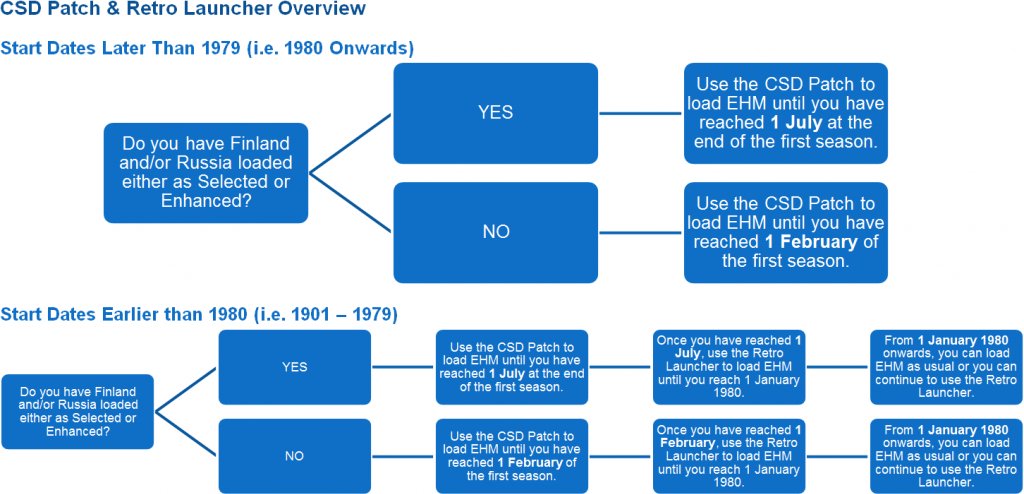
START DATES LATER THAN 1979 (I.E 1980 ONWARDS)
You only need to use the Custom Start Date Patch. You do not need to use the Retro Launcher.
START DATES EARLIER THAN 1980 (I.E. 1901 - 1979)
You must use the the Retro Launcher to load EHM
once you have reached the point where you no longer need to use the CSD Patch (i.e. after you have reached 1 February / 1 July of the first season).
Once you have reached 1 January 1980 in game, there is no need to use the Retro Launcher any further (but you may if you wish).
FURTHER INFORMATION IS PROVIDED WITHIN THE README.PDF INCLUDED WITH THE PATCH.